Assigning Journey Task to L2 Managers in Oracle HCM – A Practical Workaround

In several discussions on Oracle Customer Connect, one recurring requirement has stood out—clients often want to assign a journey task to an employee’s L2 (second level) manager. Oracle HCM does not provide a direct way to configure this out of the box. However, there’s a practical workaround to meet this need. In this blog post, let us see the steps to make it happen.
Workaround Steps to Assign Journey Task to L2 Manager:
1. Create the Journey Configuration
Set up a journey that includes the task you want to assign to the L2 manager. At this stage, you can configure the task assignment to either a specific user or the employee’s L1 manager as a placeholder.
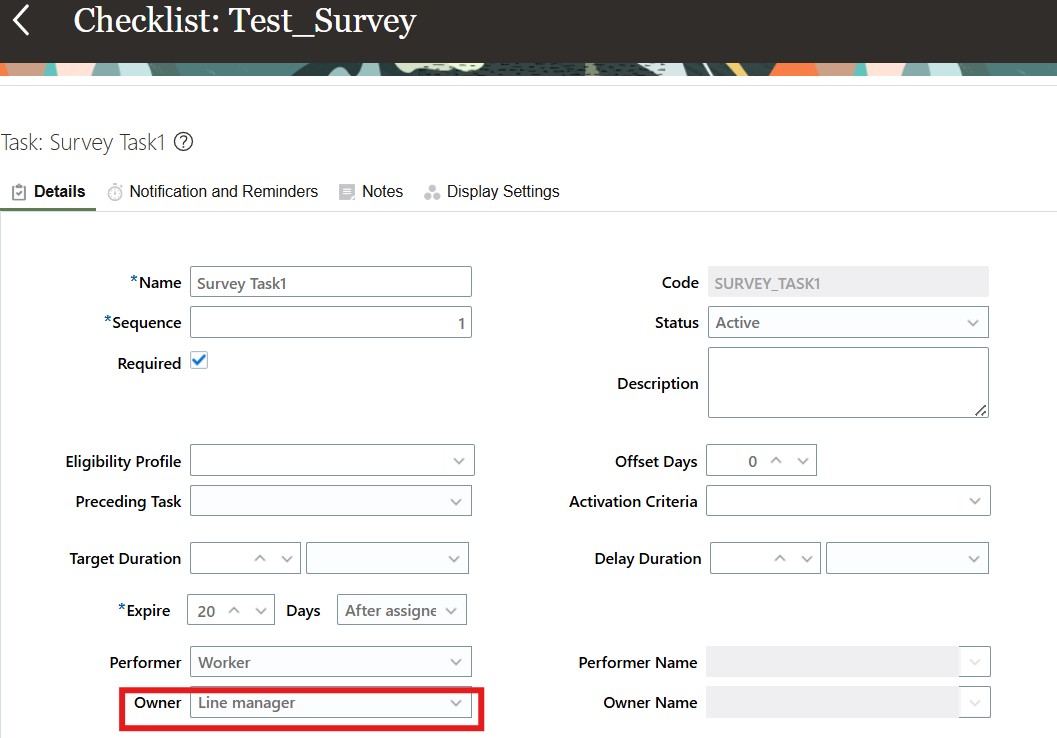
2. Assign the Journey Using AllocateChecklist.dat
Use the AllocateChecklist.dat HDL file to assign the journey to the employee. This method ensures that system notifications are not triggered.
You can check out the below blog to get the details of how to assign journeys using HDL:
3. Reassign the Task via HDL to L2 Manager
Once the journey is assigned, use an HDL load to reassign the specific task to the employee’s L2 manager. This enables you to effectively route the task to the correct level of management.
Here is the HDL – save it as “AllocateChecklist.dat”:
METADATA|AllocateChecklistTask|TaskName|ChecklistName|ChecklistCategory|ChecklistInstance|PersonNumber|TaskPerformerPersonNumber|PerformerRole
MERGE|AllocateChecklistTask|Survey Task1|Test_Survey|OFFBOARD|1|2513|1501|ORA_ADHOC_USER
Explanation for fields for ChecklistMassAllocation
TaskName: Name of the task which you want to reassign.
ChecklistName: Name of journey.
ChecklistCategory: Pass the appropriate lookup code for the journey category, which is derived from the CHECKLIST_CATEGORY lookup based on the journey setup.
ChecklistInstance: A journey instance starts with the number 1. If you do not see any number in brackets, then default to 1 else default to the number in brackets.
PersonNumber: Employee ID of the worker to whom the journey is assigned.
TaskPerformerPersonNumber: L2 manager number to whom the task must be assigned.
Here is the sample query to find out all the level manager number:
SELECT
  B.PERSON_NUMBER,
  (SELECT PER.DISPLAY_NAME
    FROM PER_PERSON_NAMES_F PER
    WHERE PER.PERSON_ID = A.PERSON_ID
      AND SYSDATE BETWEEN PER.EFFECTIVE_START_DATE
      AND PER.EFFECTIVE_END_DATE
      AND PER.NAME_TYPE = 'GLOBAL'
  ) PERSON_NAME,
  A.MANAGER_LEVEL,
  (SELECT MAN.PERSON_NUMBER
    FROM PER_ALL_PEOPLE_F MAN
    WHERE MAN.PERSON_ID = A.MANAGER_ID
      AND SYSDATE BETWEEN MAN.EFFECTIVE_START_DATE
      AND MAN.EFFECTIVE_END_DATE
  ) MANAGER_EMPLOYEEID,
  (SELECT MAN.DISPLAY_NAME
    FROM PER_PERSON_NAMES_F MAN
    WHERE MAN.PERSON_ID = A.MANAGER_ID
      AND SYSDATE BETWEEN MAN.EFFECTIVE_START_DATE
      AND MAN.EFFECTIVE_END_DATE
      AND MAN.NAME_TYPE = 'GLOBAL'
  ) MANAGER_NAME,
  A.MANAGER_TYPE
FROM
  PER_MANAGER_HRCHY_DN A,
  PER_ALL_PEOPLE_F B
WHERE A.PERSON_ID = B.PERSON_ID
  AND B.PERSON_NUMBER = '2513'
  AND A.MANAGER_TYPE = 'LINE_MANAGER'
  AND SYSDATE BETWEEN A.EFFECTIVE_START_DATE AND A.EFFECTIVE_END_DATE
  AND SYSDATE BETWEEN B.EFFECTIVE_START_DATE AND B.EFFECTIVE_END_DATE
ORDER BY MANAGER_LEVEL
While this is not a native configuration option in Oracle HCM, the above approach provides a reliable workaround until direct assignment to L2 managers becomes supported.